
TI-84 Graphing Calculator Online Free & Easy to Use
The TI-84 graphing calculator has been a classroom staple for years. Whether you’re tackling algebra, calculus, or statistics, it’s often the go-to tool. But today, not everyone owns a physical device, and that’s where the online TI-84 graphing calculator comes in. In this guide, we’ll break down how virtual versions work, when to use them, and which options are actually worth your time.
A TI-84 Graphing Calculator Online lets students graph functions, solve equations, analyze statistics, and practice using a familiar calculator interface directly from a web browser. It can be useful for homework, remote learning, exam preparation, and for anyone who wants to practice TI-84-style calculations without carrying a physical device.
If you want to try a browser-based calculator, you can use our TI-84 Calculator Online tool to practice graphing, calculations, and common TI-84-style workflows directly online.
Table of Contents
Benefits of Using a TI-84 Graphing Calculator Online
A TI-84 Graphing Calculator Online offers powerful graphing capabilities without the expense of a physical calculator. Whether you’re a student, teacher, or professional, it provides a fast and convenient way to solve mathematical problems anytime, anywhere.
🌐 Access Anywhere
Use your calculator on a laptop, tablet, or smartphone from any location with an internet connection.
💰 Save Money
Avoid spending money on an expensive physical graphing calculator while still enjoying similar functionality.
📈 Practice Anytime
Experiment with graphs, equations, and functions whenever you need extra practice or homework support.
📝 Exam Preparation
Build confidence by using a calculator interface that closely resembles the real TI-84 used in classrooms.
🎓 Remote Learning Support
An excellent solution for online learning, virtual tutoring, homeschooling, and distance education.
What Is a TI-84 Graphing Calculator?
The TI-84 Plus and TI-84 Plus CE are graphing calculators developed by Texas Instruments. They are designed to graph functions, solve equations, perform statistical analysis, and support other mathematical workflows.
Students commonly use TI-84 calculators for:
- High school math, including Algebra, Geometry, and Pre-Calculus
- College-level courses, including Calculus and Statistics
- Certain standardized tests where approved calculators are permitted
The TI-84 Plus and TI-84 Plus CE are graphing calculators developed by Texas Instruments.
What Is a TI-84 Graphing Calculator Online?
A TI-84 Graphing Calculator Online is a browser-based tool that allows students to graph equations, solve mathematical problems, and practice common TI-84-style calculator workflows without owning a physical device. It can be useful for homework, online learning, graphing practice, and learning how to use a graphing calculator.
A browser-based version can be especially helpful for students who want to practice entering functions, adjusting graph window settings, and exploring graphing workflows directly from a computer, tablet, or smartphone.
Why Use an Online TI-84 Graphing Calculator?
A virtual TI-84 graphing calculator online mimics the physical device but runs in your browser. No downloads, no hardware required.
Here’s why people are switching:
1. Accessibility Anywhere
You can access a TI-84 calculator online from any device, including laptops, tablets, and smartphones.
2. Cost Savings
A physical TI-84 can be expensive. Many free online TI-84 Plus CE graphing calculator tools offer similar functionality at no cost.
3. Convenience for Learning
Students can quickly experiment with graphs, test equations, and visualize concepts without carrying extra hardware.
Key Features of a Good Online TI-84 Calculator
Not all tools are equal. If you’re searching for a scientific graphing calculator online, here’s what actually matters.
Graphing Capabilities
- Plot linear, quadratic, and trigonometric functions
- Zoom, trace, and analyze graphs
- Handle multiple equations simultaneously
Equation Solving
- Solve algebraic equations
- Work with systems of equations
- Perform numerical approximations
User Interface Similarity
The best online version of the TI-84 graphing calculator closely matches the original keypad and layout. This is especially useful for exams or classroom practice.
Speed and Responsiveness
Lag kills productivity. A good online virtual TI-84 graphing calculator should feel smooth and instant.
📊 TI-84 Online vs Other Graphing Tools
You might wonder why not just use something like Desmos. Here’s a quick comparison to help you choose the right tool.
🧮 TI-84 Online Calculators
✅ Pros
- Familiar interface
- Matches classroom expectations
- Ideal for test preparation
❌ Cons
- Sometimes slower
- Limited modern UI improvements
📈 Desmos
✅ Pros
- Extremely fast and intuitive
- Better for visual learning
- Works great for quick graphing
❌ Cons
- Doesn’t replicate TI-84 button workflow
- Not always allowed in exams
Besides tools like Desmos, platforms such as GeoGebra also offer powerful graphing features with a more modern interface.
For users who only need scientific functions rather than advanced graphing features, a TI 30 XS Calculator Online can be an excellent alternative. It provides essential scientific calculations while remaining simple and easy to use.
If your goal is to graph functions on a TI-84 online for learning how the actual calculator works, stick with a TI-84 simulation. If you just want speed and clarity, modern tools are hard to beat.
Popular Ways to Access a TI-84 Calculator Online
Let’s break down the most common options.
1. Official Texas Instruments Software
Official Texas Instruments calculator software may be available through licensed education or software products, depending on the specific calculator model and program. These options can provide an accurate digital experience, but availability and licensing requirements may vary.
2. Browser-Based TI-84 Simulators
Many browser-based emulators function as a TI-84 simulator, allowing students to practice with a virtual calculator that closely resembles the original device’s interface and functionality. These tools are convenient because they can often be accessed directly through a web browser without installing additional software.
Searches such as:
- TI-84 Plus online graphing calculator
- TI-84 graphing calculator online
- TI-84 calculator simulator
will typically lead users to browser-based tools and virtual calculator platforms.
3. Hybrid Graphing Tools
Some platforms combine TI-style input with modern graphing engines. These tools can be useful for users who want:
- Fast calculations
- Clear graph visualization
- A cleaner, modern interface
- A balance between familiar calculator workflows and modern online features
The best option depends on whether your priority is practicing a familiar TI-84-style interface, exploring graphs visually, or completing calculations quickly.
🧮 How to Use a Virtual TI-84 Calculator
If you’ve never used one before, don’t worry; it’s easier than it looks.
① Enter Graph Mode
Press the equivalent of the Y= button.
② Input Your Function
Enter your equation.
Example:
Y1 = X² + 3X − 5
③ Graph the Function
Hit the GRAPH button to display the graph.
④ Adjust Window Settings
Use WINDOW to change the viewing range if needed.
⑤ Analyze the Graph
Use helpful tools such as:
- TRACE – Follow points on the graph
- CALC – Find roots, intersections, and other values
✅ This process works almost identically across any graphing TI-84 calculator online.
If you’re new to graphing calculators, our How to Use a TI-84 Calculator Online guide explains the most common functions, graphing shortcuts, and keyboard controls in greater detail.
Our Testing Experience with the Online TI-84 Calculator
To evaluate the online TI-84 calculator, we tested common graphing workflows using practical examples. We entered functions, adjusted the graph window, opened the graphing screen, and checked how quickly the calculator responded to different controls.
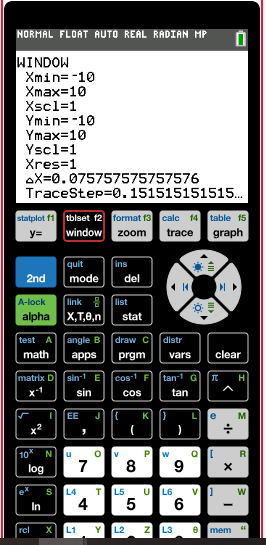
1. Testing the Window Settings
We first opened the WINDOW settings to review and adjust the graphing range, including the Xmin, Xmax, Ymin, and Ymax values. Adjusting these settings helps users control how much of a graph is visible on the screen.
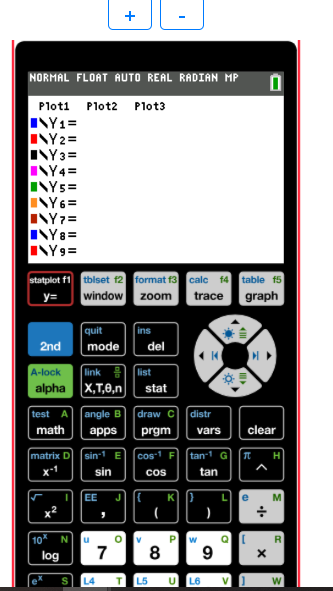
2. Testing Function Input
We then opened the Y= screen to review the function-entry area. This is where users can enter and manage multiple equations before viewing them on the graph screen.
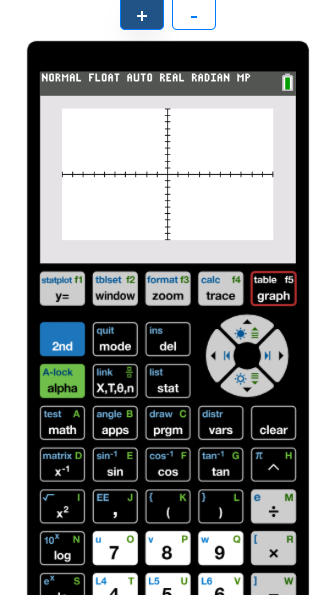
3. Testing the Graphing Screen
Finally, we opened the graphing screen to check the graph display and navigation controls. We also checked how smoothly the calculator responded when moving between the main graphing functions and adjusting the viewing area.
Common Use Cases
Homework and Practice
Students often use a TI-84 Plus CE online graphing calculator to double-check answers or visualize problems.
Exam Preparation
Practicing with a virtual TI-84 graphing calculator helps build muscle memory for real exams.
Remote Learning
Online calculators became especially important during virtual classes.
Who Should Use a TI-84 Graphing Calculator Online?
A TI-84 Graphing Calculator Online is useful for a wide range of users:
- High school students studying Algebra, Geometry, and Pre-Calculus
- College students taking Calculus and Statistics courses
- Teachers demonstrating graphing concepts in class
- Tutors providing online math instruction
- Homeschool students looking for flexible learning tools
Limitations to Keep in Mind
Even the best online TI-84 graphing calculator isn’t perfect.
Internet Dependency
No connection means no calculator.
Exam Restrictions
Always verify calculator policies before taking standardized exams.
ACT Calculator Policy
Students taking the ACT should also review the official calculator guidelines before exam day.
Performance Differences
Some tools may lag or behave slightly differently from a real TI-84.
Tips for Choosing the Right Tool
When searching for a Texas Instruments TI-84 graphing calculator online, keep it simple:
- Choose tools with a clean interface
- Avoid sites overloaded with ads
- Test responsiveness before relying on it
- Stick to reputable platforms
If you’re serious about learning, consistency matters more than features.
Are Free TI-84 Online Calculators Safe?
Generally, yes, but with caution.
Stick to:
- Educational platforms
- Recognized tools
- Official sources when possible
Avoid:
- Sketchy download prompts
- Sites requesting unnecessary permissions
A good TI-84 calculator online graphing tool should work instantly in your browser without requiring installation.
When Should You Choose an Online TI-84 Instead of a Physical Calculator?
Cover:
- You already own a laptop.
- You want to practice outside the classroom.
- You don’t want to spend money on hardware.
- You need quick access while studying.
- You want to learn the TI-84 interface before buying one.
This satisfies additional user intent and broadens topical coverage.
Final Thoughts
The TI-84 Graphing Calculator Online is more than just a backup; it’s practical and flexible for current learning. Whether you’re using a TI 84 Calculator Online, a realistic TI 84 Simulator, or a TI-84 Graphing Calculator Online, these tools make advanced mathematics more accessible than ever.
If you’re preparing for exams, go with a realistic TI-84 emulator. If you’re learning concepts, mix it with more visual tools. Either way, you don’t need to spend a foTI-84 or carry extra weight in your backpack to get the job done.