
TI-84 Plus CE: Complete Guide to Charging, Battery, Models & FAQs
The TI-84 Plus CE is one of the most widely used graphing calculators in the world. Students carry it to math class, pull it out for SAT and ACT prep, and somehow manage to drain the battery the night before a big exam. Sound familiar
Whether you just picked up a Texas Instruments TI-84 Plus CE color graphing calculator or you’ve owned one for years, this guide covers everything. From how to charge it, to what the battery icons actually mean, to how it compares with older TI-84 models. We’ve also included the latest 2025–2026 updates on SAT policy and Texas Instruments’ newest calculator release.
What Is the TI-84 Plus CE?
The TI-84 Plus CE is a color graphing calculator made by Texas Instruments. It’s the standard tool in high school and college math and science classrooms across the United States. CE stands for “Color Edition.”
The TI-84 Plus CE was publicly previewed in January 2015 and released later that year. It retains a 320×240-pixel color screen and rechargeable battery, while running six times more memory and three times the speed of its predecessor. It uses the eZ80 processor from Zilog and has 154 KB of user-accessible RAM and 3.0 MB of Archive memory.
Unlike the older TI-84 models that took AAA batteries, the CE runs on a built-in rechargeable lithium-ion battery. That means no battery runs, but it does mean you need to charge it correctly.
Table of Contents
How to Recharge TI-84 Plus CE
Charging the TI-84 Plus CE is genuinely simple. The number of students who discover the charging port only after their calculator dies mid-exam is, unfortunately, very high.
Standard Charging Methods
The TI-84 Plus CE charges via a Mini-USB cable, not Micro-USB, not USB-C (that comes with the new TI-84 Evo). It’s Mini-USB, the same connector used by older digital cameras and PS3 controllers. Texas Instruments includes one in the box, but any Mini-USB cable works.
The TI-84 Plus CE can be charged from a computer, though TI Connect CE software should be installed beforehand to ensure the appropriate USB drivers are in place. A dedicated TI-84 Plus CE Wall Adapter is also available, providing a USB outlet connected to the calculator via the standard cable. Texas Instruments
Charging options include:
- A computer’s USB port (with TI Connect CE installed for reliable charging)
- A USB wall adapter rated at 5V, 1A or higher
- A powered USB hub
Steps to Recharge TI-84 Plus CE
- Locate the Mini-USB port on the top-right edge of the calculator.
- Plug the Mini-USB end of the cable into the calculator.
- Connect the USB-A end to your computer, wall adapter, or hub.
- The screen shows a charging indicator, a battery icon with a lightning bolt.
- Charging takes approximately four hours for a full charge. The calculator operates normally while attached to a charging source; there is no need to turn it off. Texas Instruments
That’s it. No special mode, no buttons.
One important note: Around 2021, Texas Instruments removed the LED charging light from the TI-84 Plus CE, notably on the black model. So if you’re charging a newer black CE and see no normal light. Check the on-screen battery icon instead. Wikipedia
How to Charge TI-84 Plus CE Without a Charger
Forgot the cable? Here’s what actually works:
- Borrow a Mini-USB cable: older cameras, GPS devices, and PS3 controllers all use the same connector. More common than people realize.
- Use any computer USB port: no wall adapter needed. A laptop USB port provides enough current.
- Check the charging requirements: TI recommends using a UL-certified USB charger rated for at least 1 amp (labeled “1A” or “1000 mA”). Flip any wall charger over to verify the UL certification on the label.
TI-84 Battery Icon and Its Meanings
The battery icon in the top-right corner of your screen tells you everything you need to know. Here’s what each state means:
| Icon State | Meaning |
| Full battery | Fully charged, ready to go |
| ¾ full | Good charge remaining |
| Half battery | Charge with a day or two |
| 1 bar | Low charge on |
| Empty / flashing | Critical may shut off |
| Lightning bolt overlay | Currently charging |
When the battery hits critical, the calculator will warn you and eventually power down. It won’t auto-save your work. Don’t wait for the last bar.
Different TI-84 Models and Their Charging
Not every TI-84 charges the same way. This trips up a lot of people who switch between models.
TI-84 Plus (Standard Model)
The original TI-84 Plus has no rechargeable battery. It runs on 4 AAA batteries plus a small CR1616 or CR1620 backup coin cell for memory. No USB port for charging exists on this model; just swap the AAs when they die.
TI-84 Plus Silver Edition
The TI-84 Plus Silver Edition also runs on 4 AAA batteries. It has more flash memory than the standard Plus, but still no built-in rechargeable battery. Same situation, change the batteries, and you’re good.
TI-84 Plus CE (Color Edition)
This is the current model. The TI-84 Plus CE features a replaceable 1200 mAh rechargeable lithium-ion battery, designed to last up to one month with standard use. It’s lighter and thinner than older models, has a color backlit display, and charges over Mini-USB. This is the only TI-84 model where “how to charge” is actually relevant. iFixit
TI-84 Plus CE Python
The TI-84 Plus CE Python was released in 2021 and replaced the standard TI-84 Plus CE in the North American market. It adds Python programming via a CircuitPython co-processor. Charging is identical to the CE. As of early 2026, the Python edition is being phased out by Texas Instruments; newer units will ship without Python
Is the TI-84 Plus CE Allowed on the SAT and ACT?
Yes, and this is the most searched question about this calculator for a reason.
SAT: The TI-84 Plus CE is fully permitted on the SAT Math section. One major 2025 policy update to know: starting August 2025, the College Board banned all CAS (Computer Algebra System) calculators from the SAT, including models like the TI-89 Titanium and TI-Nspire CAS. The TI-84 Plus CE is not a CAS calculator, so it remains completely allowed. Tutor Doctor
ACT: All versions of the TI-84 series, excluding CAS versions, are allowed on the ACT exam. The TI-84 Plus CE is non-CAS and fully permitted. Texas Instruments
TI-84 Evo: The new TI-84 Evo is also approved for ACT, SAT, IB, and AP exams. PR Newswire
Always verify against the official College Board and ACT websites before your test date policies can update annually.
TI-84 Plus CE Validating OS Loop: What Is It?
The “Validating OS” loop is a startup issue where the TI-84 Plus CE gets stuck on a “Waiting” or “Validating OS” screen and fails to load normally. This problem typically occurs after an interrupted update, a corrupted operating system file, or a battery failure during the update process.
In most cases, the issue can be resolved by reconnecting the calculator to a computer and reinstalling the operating system through TI Connect™ CE. If the calculator is not detected, recovery mode may help restore the connection.
Because the recovery process involves several important steps, we recommend following our detailed Update TI-84 Plus CE OS guide for complete instructions on reinstalling the operating system, troubleshooting update errors, and restoring normal functionality.
TI-84 Plus CE Battery Replacement
The TI-84 Plus CE has a replaceable battery, and Texas Instruments officially supports this, with replacement instructions on their support site.
The TI-84 Plus CE battery is rated at 1200 mAh. If it’s holding a reduced charge or causing issues, it can be replaced using TI’s official guide. Make sure the calculator is powered off first any objects in RAM will be removed if the battery is taken out, so archive or back them up beforehand. iFixit
Options when battery life degrades:
- TI official replacement guide: available at education.ti.com, walks through the process step by step.
- iFixit guide: iFixit has a well-documented free repair guide for TI-84 Plus CE battery replacement with photos.
- Third-party batteries: widely available online. Look for 3.7V, 1200 mAh, part number 3.7L1200SPA or compatible. Higher-capacity third-party options (1500–1600 mAh) also exist.
The replacement uses contact-style connections (not wired), so it’s simpler than older TI models and takes about five minutes with a small Phillips screwdriver.
Troubleshooting TI-84 Calculator Charging Issues
If your TI-84 Plus CE won’t charge, work through this list before assuming the worst:
Try a different cable
Mini-USB cables fail often and silently. A broken cable is by far the most common cause of charging problems.
Try a different power source
Some older computer USB ports deliver inconsistent current. Switch to a wall adapter rated at 1A minimum.
Battery completely dead?
A fully depleted lithium-ion battery can take 10–15 minutes before the screen shows any charging response at all. Leave it plugged in and wait.
Newer black model showing no light?
That’s normal. Texas Instruments removed the LED charging indicator on newer CE units. Check the on-screen battery icon instead.
Stuck in a validating OS loop?
Fix the software issue using TI Connect CE first, the calculator may seem unresponsive to charging when stuck in boot.
Physical port damage?
Inspect the Mini-USB port for bent pins or debris. If damaged, contact Texas Instruments support at 1-800-842-2737 or through education.ti.com.
Battery Maintenance Tips
These habits keep your TI-84 Plus CE battery healthy longer, taken directly from TI’s official care guidelines:
TI recommends never letting the battery fully deplete and recharging at least every 2–3 weeks. Avoid leaving the calculator plugged in for more than 3 days continuously. For wall charging, use a UL-certified USB charger rated at 1A or higher. Texas Instruments
A few more practical tips:
- Lithium-ion batteries prefer partial discharge cycles. Full drain then full charge repeatedly shortens lifespan.
- Store with around 40–50% charge if it’ll sit unused for weeks.
- Heat degrades battery life. A calculator left in a hot car regularly will lose battery health faster.
- Charge the night before an important exam, not 20 minutes before.
What’s New: Meet the TI-84 Evo 2026
Big news for calculator shoppers. Texas Instruments just released a brand new model.
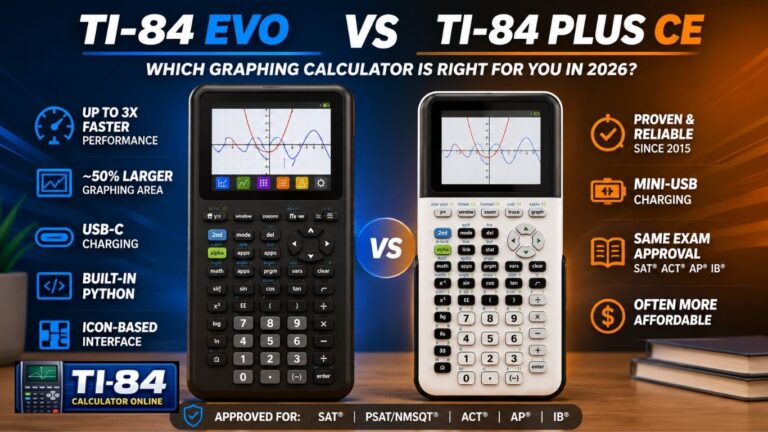
On April 28, 2026, Texas Instruments officially launched the TI-84 Evo Graphing Calculator. It features a 3x faster processor, 50% more graphing space, a redesigned keypad, USB-C charging, and an icon-based menu system and it’s approved for ACT, SAT, IB, and AP exams. PR Newswire
The TI-84 Evo runs a 156 MHz processor, compared to the 48 MHz found in the TI-84 Plus CE, making complex graphing feel noticeably faster. It’s priced at $160 for individual purchase. Gadget ReviewPC Gamer
This is the first TI-8x series calculator to include USB-C charging, so no more hunting for Mini-USB cables. The TI-84 Plus CE remains available and fully supported for current students.
TI-84 Plus CE Online Emulator
No physical calculator available? Texas Instruments offers the TI-SmartView CE emulator software for use on computers. Browser-based community emulators also exist for quick practice. For real exam days, SAT, ACT, AP, IB, you must bring a physical calculator. Online tools aren’t permitted in testing rooms.
FAQs
Q: Can I use any Mini-USB cable to charge my TI-84 Plus CE? Yes. Any standard Mini-USB (USB-A to Mini-B) cable works. TI recommends pairing it with a UL-certified wall adapter rated at 1A minimum for fastest and safest charging.
Q: How long does a full charge take? Texas Instruments states that charging takes approximately four hours for a full charge. Texas Instruments
Q: How long does the battery last on a full charge? Up to one month on a single charge, based on two hours of daily use. Heavy usage like running programs continuously for 8 hours a day, significantly reduces that figure. Texas Instruments
Q: Is the TI-84 Plus CE Python the same as the regular CE? Nearly identical hardware. The Python edition adds Python programming. Charging is the same. The Python edition is being phased out as of 2026.
Q: TI-84 Plus vs TI-84 Plus CE, which should I buy in 2026? The TI-84 Plus CE is the better choice for most students. Lighter, color screen, rechargeable battery, and actively supported. For anyone buying new in 2026, the TI-84 Evo is also now available with USB-C charging and a faster processor at $160.
Q: How do I reset my TI-84 Plus CE? Press [2nd] + [MEM], then go to Reset → All RAM → Reset. This clears stored data but keeps the operating system. For a full factory reset, use TI Connect CE software on a computer.
Q: Is the TI-84 Plus CE allowed on the SAT in 2025–2026? Yes. The TI-84 Plus CE is non-CAS and fully permitted under the College Board’s updated policy. Always confirm on satsuite.collegeboard.org before your exam date.
Q: What should I do if my TI-84 Plus CE is stuck on “Validating OS”?
This usually indicates a problem with the calculator’s operating system. In many cases, reinstalling the OS through TI Connect™ CE resolves the issue. For a complete recovery walkthrough, refer to our detailed TI-84 Plus CE OS update guide.
Conclusion
The Texas Instruments TI-84 Plus CE graphing calculator is one of the most reliable and widely used tools for students. It has a simple charging system: a mini-USB cable, a 1A USB power source, and around four hours for a full charge.
Key takeaways: it is the only TI-84 model with a rechargeable battery, it charges via Mini-USB, it is allowed on both the SAT and ACT, and the battery can be replaced when needed. Texas Instruments has also introduced the TI-84 Evo, which includes USB-C charging and improved performance.
With regular charging and proper care, the TI-84 Plus CE can last through years of school and exams.
If you face software issues, connection problems, startup errors, or a “validating OS” loop, read our How to Update TI-84 Plus CE OS guide for simple step-by-step troubleshooting and recovery instructions.



One Comment