TI-84 Evo vs TI-84 Plus CE: Which Graphing Calculator Is Better in 2026?
If you already own a TI-84 Plus CE, you may be wondering whether the new TI-84 Evo is worth upgrading to. This TI-84 Evo vs TI-84 Plus CE comparison covers the key differences to help you decide.
Texas Instruments launched the TI-84 Evo on April 28, 2026, with faster performance, USB-C charging, built-in Python, and a larger graphing workspace. However, a newer model does not always mean you need to upgrade.
The TI-84 Evo adds several newer features, while the TI-84 Plus CE remains a practical option for existing users. The right choice depends on the features you need, such as faster performance, USB-C, Python, or a larger graphing area.
TI-84 Evo vs TI-84 Plus CE at a Glance
| Feature | TI-84 Evo | TI-84 Plus CE |
| Processor | New ARM-based processor | eZ80-based processor |
| Charging Port | USB-C | Mini-USB |
| Graphing Area | Approximately 50% larger graphing workspace | Standard graph window |
| Home Screen | con-based interface | Traditional menu-based interface |
| Programming | TI-BASIC and built-in Python | TI-BASIC (Python available only on the TI-84 Plus CE Python edition) |
| Exam Approved | Approved for SAT, PSAT/NMSQT, ACT, AP, and IB* | Approved for SAT, PSAT/NMSQT, ACT, AP, and IB* |
| Release | April 28, 2026 | Introduced in 2015 |
| Suggested Retail Price | Around $160 (launch price) | Varies by retailer, condition, and bundle |
| Battery | Rechargeable battery | Rechargeable battery |
This comparison is based on official information published by Texas Instruments and publicly available product documentation as of 2026.
TI-84 Evo vs TI-84 Plus CE: What’s the Difference?
The main differences are the processor, graphing workspace, charging port, interface, and Python support. The TI-84 Evo uses a newer ARM-based processor, USB-C charging, a larger graphing workspace, and built-in Python. The TI-84 Plus CE uses an eZ80 processor and Mini-USB, while Python was offered separately on the TI-84 Plus CE Python edition.
Which Calculator Should You Buy?
Who Should Upgrade?
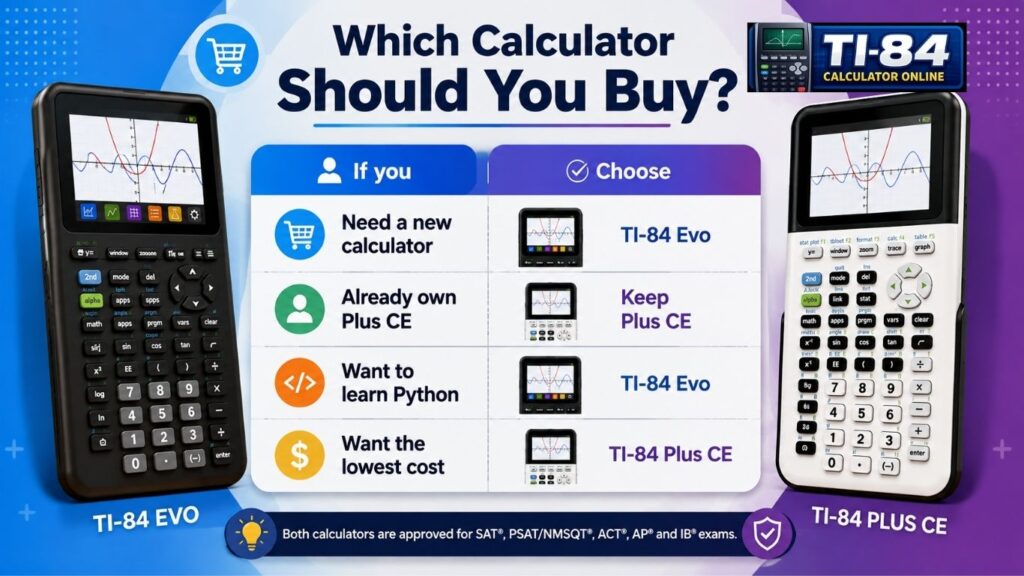
Not everyone needs the Evo right away. It makes the most sense for:
- Students buying their first handheld graphing calculator for middle school or high school
- Plus CE owners whose calculators are old, slow, or have battery problems
- Teachers are standardizing a classroom set for consistent classroom instruction
- Parents who want a one-color graphing calculator that lasts from algebra through college
If your Plus CE still works well and you’re comfortable navigating its menus, there’s little practical reason to swap it out mid-school year. If it’s acting up rather than just being outdated, it’s worth trying to reset your TI-84 calculator before deciding to replace it entirely.
Design and Build Quality
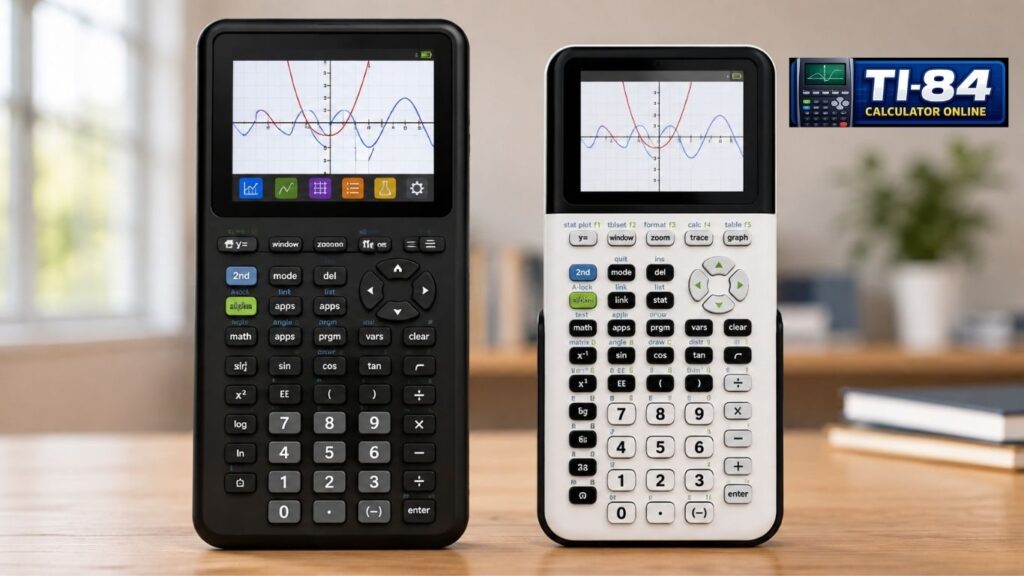
The Evo has noticeably larger buttons, and several secondary functions that used to sit printed above the keys on the Plus CE have been moved onto the keys themselves. Texas Instruments also added a new toggle key that didn’t exist on the Plus CE.
Overall, the layout feels more spread out and less cluttered, which helps younger students who are still learning where each function lives. If you’re still getting familiar with the Plus CE’s layout, our guide on how to use a TI-84 calculator covers the basics.
Table of Contents
Display Comparison
The most obvious display change is the graph size. Texas Instruments expanded the graphing window to fill nearly the entire screen rather than sit within a smaller, boxed-in area, providing an approximately 50% larger graphing workspace. This makes reading curves, tables, and zoomed-in graphs noticeably easier, a real benefit for function plotting and numerical analysis work.
Viewing angle and outdoor readability are similar between the two, since both use a high-resolution color LCD. But the larger graph window on the Evo means less squinting at small plotted details, especially for students working with multiple functions on one graph or using graph trace to read specific points. You can compare the graphing experience yourself using our TI-84 graphing calculator online.
Performance Comparison
The move from an eZ80-based processor to a new ARM architecture is the headline change, and Texas Instruments markets the Evo as up to 3x faster overall. According to Texas Instruments’ official product page, the faster processor is paired with a redesigned interface built specifically for classroom math, not general computing.
In everyday use, the speed difference shows up most in:
- Boot time: the Evo starts up noticeably quicker.
- Graph rendering: complex functions and multiple graphs draw faster with less lag.
- Zoom responsiveness: zooming in and out feels smoother with less delay.
- Tables and statistics: generating value tables and running statistical calculations feel snappier.
- Matrix and regression work: larger matrices and regression models process faster without freezing the screen.
Students working in Algebra II, precalculus, calculus, or statistics are most likely to notice the improved responsiveness during graphing and data analysis. Basic arithmetic was never slow on either calculator, as a scientific calculator, so the speed difference matters most for graphing-heavy and data-heavy tasks rather than simple calculations. Much of this speed boost comes down to the underlying TI-84 Plus CE OS architecture that the Evo moves beyond.
Programming Experience
Both calculators run TI-BASIC, so existing programs and formulas generally transfer over with little to no changes needed, which is useful if you or your teacher already have a library of custom programs using MathPrint and the equation solver. Our TI-84 calculator programming guide covers the basics if you’re new to writing your own.
The bigger difference is Python: the Evo includes Python built in from the start, while on the Plus CE line, Python was only available on a separate TI-84 Plus CE Python edition rather than the standard version. Teachers introducing Python in STEM classrooms may appreciate that every TI-84 Evo includes Python by default, eliminating the need to confirm whether students have the separate Python edition of the Plus CE, a small but practical win for STEM education and engineering students learning to code alongside math.
As of 2026, Texas Instruments has not published official support for user-installed assembly or C programs on the TI-84 Evo. Existing Plus CE assembly programs should not be assumed to work unless compatibility is confirmed by Texas Instruments. For a complete overview of the new calculator, including its release, features, and specifications, read our TI-84 Evo Complete Guide.
Software and Compatibility
If you’re moving from a Plus CE to an Evo, most TI-BASIC programs and custom formulas you’ve written should still work, since both calculators use the same core programming language. Where compatibility gets trickier is with older third-party apps and community-made programs built specifically for the Plus CE’s architecture, which may need to be rewritten or may not run at all on the Evo.
Before upgrading, you can test the experience using our TI-84 Calculator Online or TI-84 Graphing Calculator Online tools.
Data transfer between the two models works through the standard TI file-transfer process handled by TI Connect™ CE (TI Connect Evo on newer setups), so backing up variables, programs, and calculator files before switching devices is worth doing either way. As with any new calculator line, expect Texas Instruments to release periodic firmware updates for the Evo, similar to how the Plus CE received OS updates over its lifespan. You can review the full TI-84 Plus CE hardware history for context on how the line has evolved. If you write your own formulas often, our guide on how to program formulas into the TI-84 Plus CE is worth bookmarking for either model.
Battery and Charging
USB-C is the most practical everyday upgrade. The Plus CE still relies on Mini-USB, a connector fewer students carry cables for in 2026, while the Evo uses the same USB-C cable as most modern phones and laptops. Both calculators run on a rechargeable battery, so raw battery life isn’t a major differentiator between them.
Exam Approval
This is where families often worry unnecessarily: the Evo carries the same exam approvals as the Plus CE. According to Texas Instruments’ launch announcement, the TI-84 Evo is approved for all major standardized testing programs as an SAT calculator, AP calculator, and ACT calculator, including the SAT and PSAT/NMSQT through the College Board’s official calculator policy, the ACT’s calculator policy, Advanced Placement (AP) exams that allow a graphing calculator, and the IB Diploma Programme’s exam calculator policy.
Switching calculators does not put a student at a testing disadvantage, but it’s worth checking your specific exam’s official policy page to confirm current rules before test day, since guidelines from the SAT Suite of Assessments and other programs can change from year to year. For more common questions like this, see our TI-84 calculator FAQs.
Price Comparison
Prices for both calculators vary by retailer, region, and ongoing promotions, so treat any specific dollar figure as a snapshot rather than a fixed number. The Evo launched with a suggested retail price around $160, while Plus CE pricing has ranged more widely depending on the bundle and retailer.
The real financial question isn’t which one costs less today; it’s whether replacing a working Plus CE is worth it right now. For a student just starting, buying the new Evo is a reasonable long-term investment. For someone who already owns a functioning Plus CE, keeping it rather than replacing it immediately is usually the more practical choice.
Pros and Cons
- Faster processor with a larger graphing workspace.
- Modern USB-C charging and a cleaner icon-based interface.
- Built-in Python included out of the box.
- Higher price if you already own a working TI-84 Plus CE.
- No official confirmation of support for user-installed assembly or C programs.
- Still new, so there are fewer long-term user reviews and classroom experiences.
- Often available at lower prices through sales or used listings.
- Reliable and well-tested since its 2015 release.
- Approved for the same major exams as the TI-84 Evo.
- Slower performance during graphing and large data calculations.
- Uses the older Mini-USB charging port.
- Python is available only on the separate TI-84 Plus CE Python edition.
Who Should Buy Which Calculator?
| Buyer Type | Recommended Calculator |
| New middle- or high-school student | TI-84 Evo |
| College student needing something reliable now | Either based on budget |
| Teacher building a classroom set | TI-84 Evo, for consistency |
| Budget-conscious buyer | TI-84 Plus CE, especially used |
| Current Plus CE owner with no issues | Keep the Plus CE |
| Student learning Python alongside math | TI-84 Evo |
My Recommendation
If you’re purchasing your first graphing calculator in 2026, the TI-84 Evo is the better long-term choice because it includes the latest hardware, USB-C charging, and built-in Python. However, if you already own a well-functioning TI-84 Plus CE, upgrading isn’t essential unless you specifically want the newer interface or faster performance.
FAQs
Is the TI-84 Evo worth upgrading to?
Is the TI-84 Plus CE discontinued?
Is the TI-84 Evo faster than the TI-84 Plus CE?
Can the TI-84 Plus CE run Python?
Is the TI-84 Evo allowed on the SAT?
Is the TI-84 Evo better than the TI-84 Plus CE?
Is the TI-84 Evo worth it?
Is the TI-84 Plus CE outdated?
What does CE stand for in TI-84?
Final Thoughts
This TI-84 Evo vs TI-84 Plus CE breakdown shows that the Evo is a genuine step forward in speed, screen space, and everyday convenience, making it the smarter buy for anyone purchasing new in 2026. But the TI-84 Plus CE isn’t obsolete; it still meets every major exam requirement and handles the same math just as reliably.
Ultimately, both calculators remain capable choices for algebra, geometry, trigonometry, calculus, statistics, and standardized testing. The right decision depends less on what each calculator can do and more on whether you need the Evo’s newer hardware and interface or simply want a dependable graphing calculator that continues to meet classroom and exam requirements. Our how-to graph on a TI-84 calculator guide works for both.
Learn More
- TI-84 Calculator Online — try either calculator’s core functions for free
- TI-84 Simulator — a full hands-on practice tool
- TI-84 Calculator Without Download — no install, no wait
- Virtual TI-84 Graphing Calculator —another way to test graphing features online