
TI-84 Evo: Complete 2026 Guide to Texas Instruments’ Newest Graphing Calculator
If you’ve heard students or teachers talking about a new calculator this year, they’re probably talking about the TI-84 Evo. Texas Instruments has been making the same basic TI-84 shape for decades, so when a real update shows up, it’s worth paying attention to.
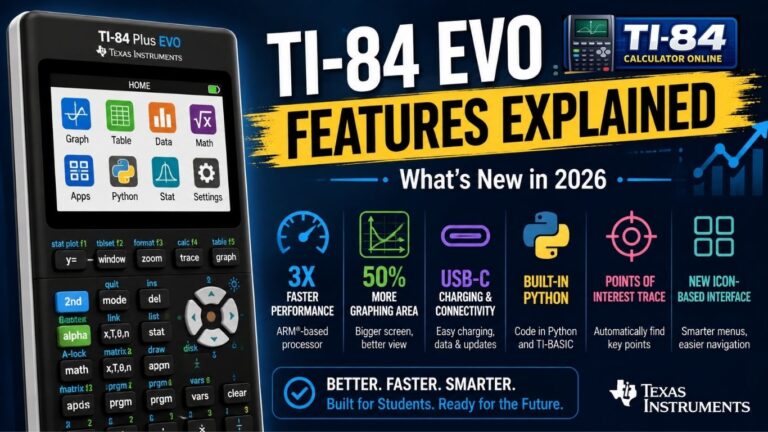
The TI-84 Evo is Texas Instruments’ newest graphing calculator, released on April 28, 2026, as the replacement for the TI-84 Plus CE Python. It features a faster ARM-based processor, USB-C charging, a redesigned icon-based home screen, built-in Python and TI-BASIC programming, and approval for major standardized tests like the SAT, ACT, and AP exams.
This guide walks through everything worth knowing about the TI-84 Evo calculator: its release date and price, specs, operating system, programming options, what’s in the box, and honest pros and cons to help you decide whether it’s worth buying. If you’re brand new to TI-84 calculators, the TI-84 is a good starting point before diving into what’s different about the Evo.
Release Date and Price
The TI-84 Evo launched in the United States on April 28, 2026, replacing the TI-84 Plus CE Python model. It’s not a brand-new product line, but a direct upgrade to a calculator millions of students already know and can read. Texas Instruments’ official launch announcement for the full feature rundown is available.
As for this graphing calculator’s price, it retails at around $160, with a multi-year license to an online calculator version included at no extra cost. Schools and districts can also contact Texas Instruments directly for bulk classroom pricing.
This TI-84 calculator is currently sold in seven colors: white, mint, pink, purple, teal, raspberry, and silver, so students have a bit more personal style to choose from compared to older models.
What’s in the Box
Every new TI-84 Evo unit ships with the essentials needed to start using it right away:
- The graphing calculator unit itself
- A slide-on cover and a USB-C charging cable
- A quick-start reference card covering basic setup
There’s no separate charging brick included, since this calculator charges the same way most phones and laptops do today: plug the USB-C cable into any standard USB port or wall adapter you already own.
Key Features and Specifications
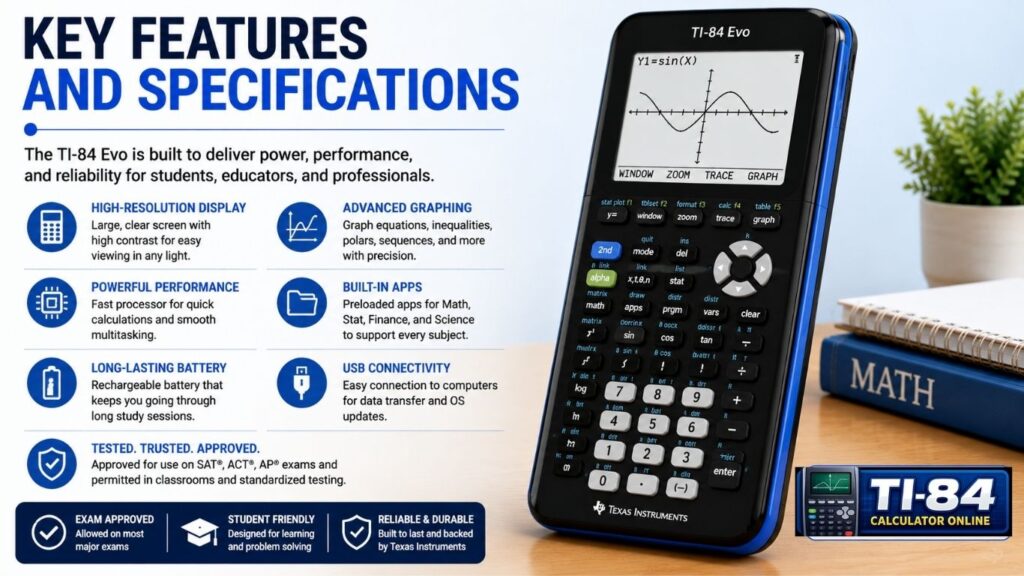
Processor and Graphing Speed
One of the biggest upgrades is under the hood. This graphing calculator uses an ARM Cortex processor that runs significantly faster than the chip used in earlier TI-84 models, which Texas Instruments and independent reviewers describe as roughly a threefold speed increase. In everyday use, that means faster graphing, quicker calculations, and noticeably less waiting when working with complex functions or multiple graphed equations at once.
Display and Graph Window
The screen keeps the same physical resolution as the TI-84 Plus CE, but Texas Instruments has fit a larger graph window into that space, giving roughly 50% more visible graphing area. In practice, this means curves render more clearly on the coordinate plane, axis labels are easier to read at a glance, and students can spot patterns in a function table without everything feeling cramped. Using graph trace to move along a curve or jumping to Zoom Standard to reset your view, both feel snappier thanks to the new processor. You can get a feel for graph tracing and zooming with our TI-84 graphing calculator online tool.
Home Screen and Interface
The TI-84 Evo’s interface is built around an icon-based home screen. Instead of digging through menus, the redesign puts the most popular math tools in plain view, organizing everything into clear categories for faster navigation. Texas Instruments also added a small touch that’s easy to miss but genuinely useful for beginners: a status bar that offers helpful hints as you work without giving away the answer outright.
The keypad itself has been simplified too, with larger buttons and clearer labeling, cutting down on the guesswork that used to trip up students learning where basic functions live for the first time. The entry line and cursor behave in the same familiar way they always have, so anyone coming from an older TI-84 won’t need to relearn basic typing and editing.
Battery and Charging
The battery is a rechargeable, built-in cell designed to last from the first day of class through exam day. Charging happens over USB-C, replacing the older Mini-USB cables used on the TI-84 Plus CE. That’s a welcome, practical change, since USB-C is now the same cable format used by most phones, tablets, and laptops that students already carry, meaning one less cable to keep track of in a backpack.
Operating System, Math Tools, and Apps
The TI-84 Evo’s operating system has been rebuilt to take advantage of the new processor rather than simply running old software faster. Built-in math tools carried over and expanded from earlier models include:
- Equation editor and solver, for solving numerically across different variables
- Polynomial root finder, described by Texas Instruments as supporting higher-order polynomials than a basic scientific calculator can handle
- Systems of equations solver, capable of handling multiple equations and unknowns at once
- Regression analysis, with several regression models including linear, logistic, sinusoidal, logarithmic, and polynomial types
- Statistical plots, covering scatter plots, histograms, box-and-whisker plots, and normal probability plots
- MathPrint mode, displaying fractions and expressions the way they’d appear on paper
- Business functions, including time-value-of-money, cash flow, and amortization calculations
The function editor, list editor, and variable and memory storage all carry forward the same logic long-time TI-84 users already know, just running faster on the new hardware. Because the operating system supports updates over USB, new features and bug fixes can be installed after purchase, and connecting to a computer with TI Connect Evo software allows files and programs to move back and forth easily.
Python and Programming
Programmable calculators have always been part of the TI-84 Evo’s appeal, and this model keeps that tradition alive with two languages side by side:
- TI-BASIC, the classic scripting language used on TI-84 calculators for years
- Python, carried over the same way it was available on the TI-84 Plus CE Python edition; it replaces
Programming through Python lets students write short scripts and connect them to the device’s math engine, which is a genuinely helpful bridge between classroom math and real coding skills, not just a marketing checkbox. TI-BASIC remains available for students who want to keep things simple or who are following along with programs written for older TI-84 models. Practicing the underlying logic first in our browser-based TI-84 calculator online tool can make picking up either language a little easier.
Evo vs Plus CE: A Side-by-Side Comparison
So how does this graphing calculator vs. TI-84 Plus CE comparison actually shake out? Here’s a fuller breakdown:
| Feature | TI-84 Plus CE | TI-84 Evo |
| Processor | Older chip, slower graphing | ARM Cortex, roughly 3x faster |
| Screen | Same physical resolution | Same resolution, ~50% larger graph window |
| Battery | Rechargeable | Rechargeable |
| Charging | Mini-USB | USB-C |
| Home screen | APPS menu | Icon-based home screen |
| Operating system | TI-84 Plus CE OS | Rebuilt OS for the new processor |
| Python | Only on the Python edition | Included by default |
| Online license | Not standard | Included for multiple years |
| Weight | Standard handheld weight | Comparable handheld weight |
| Supported exams | SAT, ACT, AP, IB | SAT, ACT, AP, IB |
If you already own a TI-84 Plus CE, it still works perfectly well for class and exams, and it isn’t suddenly obsolete. The Evo is best thought of as a faster, more polished version of the same core tool rather than a totally different calculator. You can compare both side by side on our TI-84 Plus CE page or check our TI-84 Plus CE OS guide for firmware details on the older model.
What This Actually Means Day to Day
Specs on a page only tell you so much. What actually changes for a student sitting in class or working through homework comes down to a few small, practical things.
The speed difference shows up most when you’re graphing more than one function at a time or tracing along a curve to find a specific point. On an older TI-84, there’s a small but noticeable pause before the graph finishes drawing, especially with anything involving trigonometric functions or a busy window setting. On the Evo, that pause mostly disappears, which matters more than it sounds like during a timed test when every extra second counts.
The icon-based home screen also changes how quickly a new student gets comfortable. Instead of memorizing which menu hides which tool, a student can see the equation solver, graphing, and statistics tools laid out from the very first time they turn it on. Teachers who’ve fielded the same “where do I find this” questions every semester will likely notice fewer of them with this layout. Our guide on how to graph on a TI-84 calculator covers the same basic navigation, whether you’re on a Plus CE or an Evo.
USB-C charging is a small change on paper, but it solves a real annoyance: not owning the right cable. Since almost every household already has USB-C cables for phones and laptops, students are less likely to show up to class with a dead calculator and no way to charge it.
None of this means every student needs to rush out and replace a calculator that already works. A TI-84 Plus CE that graphs correctly. Our past exam inspection is still a completely capable tool. This calculator mainly earns its price for students who are buying new anyway or whose coursework leans heavily on graphing and programming, where the speed and interface improvements are felt the most.
Pros and Cons
✅ Pros
- The TI-84 Evo delivers noticeably faster graphing and calculations thanks to the new processor.
- USB-C charging matches cables students already use for other devices.
- Larger effective graph window on the same screen size.
- Cleaner, icon-based navigation that’s easier for beginners to learn.
- Both TI-BASIC and Python are built-in, without needing a separate edition.
- Free multi-year online calculator license included with purchase.
- Still approved for the SAT, ACT, AP, and IB exams.
❌ Cons
- Costs more upfront than buying a used TI-84 Plus CE.
- Programs and games written for older TI-84 models may not run directly, since the underlying processor is different.
- The core screen resolution hasn’t changed, so the jump is about speed and layout more than raw visual fidelity.
- Students who already own a working TI-84 Plus CE may not see enough benefit to justify replacing it mid-year.
Who Should Buy This Calculator
This graphing calculator makes the most sense for:
- Students buying their first graphing calculator for algebra, geometry, or a STEM-focused class, where the icon-based layout makes onboarding easier
- Families replacing an aging or damaged TI-84 model
- Students heading into AP Calculus, AP Statistics, or college-level math who will lean heavily on graphing, regression, and matrix tools
- Anyone who wants Python and TI-BASIC programming available on the same device without hunting for a specific edition
Who Should Skip It
The TI-84 Evo is a harder sell for:
- Students with a fully working TI-84 Plus CE who don’t need the speed boost or USB-C charging badly enough to justify the cost
- Budget-conscious buyers who can find a reliable used TI-84 Plus CE for significantly less
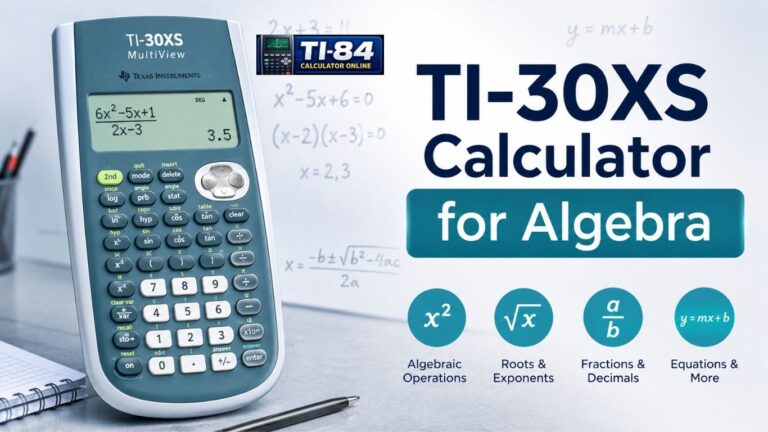
- Anyone whose coursework only requires a basic scientific calculator, where a simpler model like the TI-30XS may be more appropriate and considerably cheaper
Exam Approval and Student Use

For students asking whether this graphing calculator is allowed for the SAT, ACT, or AP exams, the answer is yes. It’s approved for the ACT, SAT, IB, and AP exams, the same major tests that accept the TI-84 Plus CE. As always, calculator policies are reviewed periodically by each testing organization, so it’s smart to check the official guidance close to your test date rather than assuming last year’s rules still apply.
Because it handles everything from basic algebra through statistics, calculus, and matrix work, this math calculator works just as well in a middle school classroom as it does in an AP-level course.
Emulator and Online Access
Every purchase comes with a multi-year license to an official online version of the calculator, so students can practice the same functions on a school or home computer. If you want to try this graph-plotting tool out before deciding whether to upgrade, our TI-84 calculator online tool and TI-84 graphing calculator online let you test graphing, tables, and basic functions in your browser first, with no installation required. Prefer something even lighter? Our virtual TI-84 graphing calculator and TI-84 calculator without download pages cover browser-only options that skip installation entirely, and our TI-84 simulator and free TI-84 calculator emulator online are worth a look if you specifically want an online graphing simulator experience rather than the official TI license. If you’re comparing against the older model specifically, our TI-84 Plus CE online emulator page walks through that version.
TI-84 EVO FAQs
Is the TI-84 EVO allowed?
Yes, the TI-84 EVO is approved for use on the SAT, ACT, AP, and IB exams, subject to each test’s current calculator rules.
Is the TI-84 EVO good?
Yes. The TI-84 EVO is a strong graphing calculator for algebra, calculus, statistics, and other advanced math courses. It also has a faster processor, USB-C charging, and more graphing space than the TI-84 Plus CE.
Is the TI-84 EVO better than the TI-84 Plus CE?
For most new buyers, yes. The TI-84 EVO offers a faster processor, more graphing space, USB-C charging, and a newer interface. The TI-84 Plus CE may still be a better choice if you already own one and it meets your needs.
How much does the TI-84 EVO cost?
The TI-84 EVO typically costs around $160 to $170, depending on the retailer and current pricing. Check the latest price before buying.
Is the TI-84 EVO worth buying if I already have a TI-84 Plus CE?
Not necessarily. The TI-84 Plus CE still handles the needs of most students. The EVO is mainly worth considering if you want a faster processor, more graphing space, USB-C charging, and the newer design.
Can I run TI-84 Plus CE games or programs on the TI-84 EVO?
Not necessarily. The TI-84 EVO uses different hardware, so programs and games made for the TI-84 Plus CE may not work on the EVO. Check compatibility before transferring software.
Can the TI-84 EVO be jailbroken?
Texas Instruments does not officially support modifying the calculator’s operating system. Modified software can also create compatibility and exam-use issues, so using official software is the safer choice.
Does the TI-84 EVO replace the TI-84 Plus CE?
The TI-84 EVO is the newer model, but the TI-84 Plus CE remains a usable and supported calculator for students who already own one. You do not need to upgrade if your Plus CE meets your needs.
What comes in the TI-84 EVO box?
The box includes the calculator, a slide-on cover, a USB-C charging cable, and a quick-start guide. A separate wall charger is not included.
Does the TI-84 EVO have more memory than the TI-84 Plus CE?
Texas Instruments does not provide enough detailed information for a reliable side-by-side memory comparison. Check the latest official specifications before assuming that TI-84 Plus CE programs or files will work on the EVO.
Final Thoughts
This TI-84 calculator is the most meaningful update to the line in years, bringing a faster processor, a friendlier interface, USB-C charging, a built-in equation solver, and Python programming to a tool students already trust. It’s not a reason to throw out a perfectly good TI-84 Plus CE, but for anyone buying new, it’s the more future-proof choice, with the classroom and exam approval to back it up.
Calculator features and firmware may change through future software updates. Always check the latest Texas Instruments documentation for the most current specifications and exam compatibility.
Want to try these features before you buy? Explore our free TI-84 calculator online and browse our full TI-84 calculator FAQ to get comfortable with graphing, equations, and the home screen layout; no purchase required. And if you’re just getting oriented, our how-to-use a TI-84 calculator guide is the best place to start from scratch.
2 Comments